
Self Introduction Video (Off Campus)
A self introduction video is a 1 – 2 minute video where an instructor introduces himself or herself to their students by sharing some information about their educational and work background.
Personalize your Online Course
Students may find it challenging to connect with their instructor in an online learning environment. A great way to establish good rapport and open communication between the instructor and student is embedding a self introduction video into the Faculty Contact section of your Blackboard site.
Create a Positive First Impression
Instructors may feel pressure to create a positive first impression on the first night of class. Not only will a positive first impression set the tone for the rest of the class, but it will also help you to develop a good relationship with your students. Creating a self introduction video is a new multimedia option available that helps instructors to get their first impression right every time.
Alternative to Shooting on Campus
Filming on campus is not always possible because:
- Some instructors live too far away
- Some instructors may not feel comfortable filming their self introduction video in a TV studio.
Do-It-Yourself Option
We offer a ‘do-it-yourself’ option where you film your own self introduction in the comfort of your own home. After you film it, you simply send us the footage so we may edit it and upload it to YouTube. Once this is done, we will send you instructions on how to embed your introduction video directly in your Blackboard site.
We recommend two options for filming your self introduction yourself: using your webcam or using a Flip camcorder. Whichever option you choose, please review these directions and best practices beforehand. If you have any questions about which option would be best for you, please contact Russ Lichterman at 302-295-1149.
Using Your Webcam
Many PCs and laptops have webcams built into them which you may use to capture your self introduction video. Once you film an introduction, you will want to watch it to make sure you are happy with the way it turned out. If you are not happy with it, just delete it and try again - it may take several takes to create version that is smooth. Once you capture an introduction that you are happy with, save it as a .mov file, and then upload it to Kaltura.
Using a Flip Camera
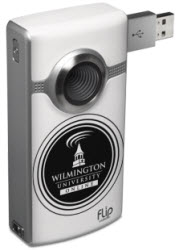
Instructors may opt to borrow a Flip camcorder and tri-pod. A Flip is a small handheld camcorder. It is popular because it is really simple to use - just press the red button to record, then point and shoot. After you film it, you just send back the camera with your footage to us for editing and uploading to YouTube.